

Odoo Development
 Hardik Soni
23 June 2026
Hardik Soni
23 June 2026
The CFO’s Guide to Migrating from Odoo Community to Enterprise
 Hardik Soni
“The secret of change is to focus all of your energy not on fighting the old, but on building the new.” – Dan Millman
Your business success will depend on how efficiently you manage operations, data, and people. Most of the growing companies still rely on multiple tools. The major disadvantage here is that the tools run solo and are not interconnected. Sales uses one system, finance another, and inventory runs separately. This fragmented setup slows decisions and lacks clarity.
That’s where Odoo comes in.
It offers a unified platform to manage every business function. Accounting, CRM, Inventory, HR, and beyond. Odoo is modular, customizable, and affordable. All this makes it ideal for companies that want enterprise-level efficiency without complexity.
Many organizations also rely on professional Odoo development services to ensure they configure the platform according to their goals and workflows.
This Odoo Guide will help you understand how the platform works and how you can leverage it for your business.
Modules and customization make Odoo special. Here’s what that means:
Unlike rigid ERP systems, Odoo doesn’t force you to adapt your business to the software. Instead, it adapts to you. It works according to your business requirements.
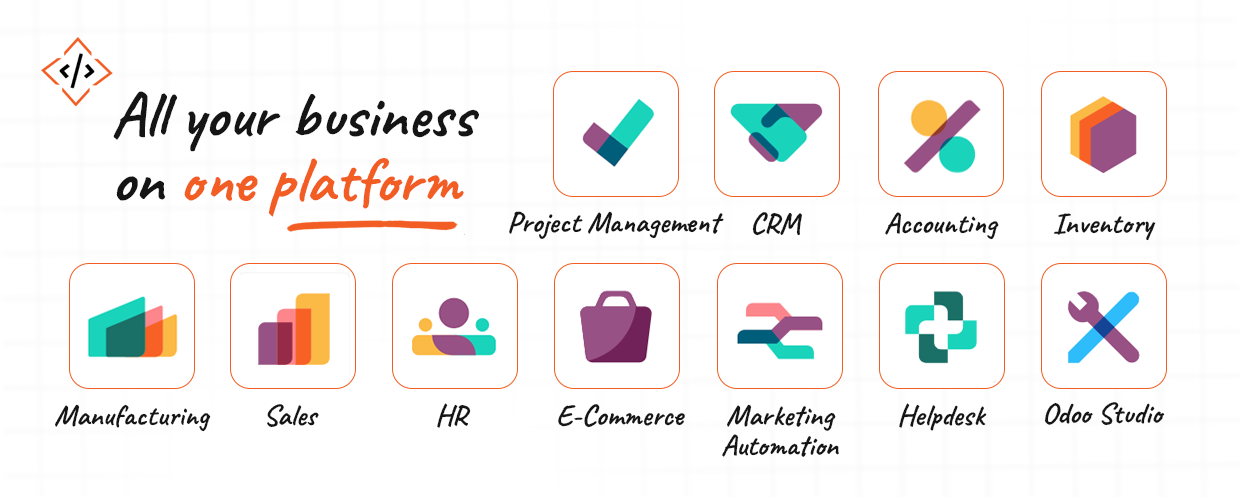
Whether you’re an executive or an IT lead, this Odoo developer guide helps you understand how modules work. Let’s learn about major modules in this Odoo guide what they actually do:
The Sales module handles everything starting from quotations to final invoices. It lets you create and send proposals directly to customers. You can track their status and turn them into sales orders in one click. You can also set multiple price lists and manage discounts.
When you confirm a sale, Odoo updates your inventory and financials. This means your stock levels and accounts always stay accurate without extra work.
For a growing business, this module brings structure to what was once a scattered sales process.
Managing leads gets easier with Odoo CRM. It captures new leads from your website or campaigns and helps your team track them stage by stage. You can see where each opportunity stands, assign tasks, and record interactions without switching screens.
Reports show who’s converting and where deals are getting stuck. Over time, this data helps you forecast better and focus on the right customers instead of chasing every lead.
Odoo’s Accounting module gives you a full view of your finances.
You can record payments, reconcile bank statements, and manage taxes – all from one dashboard. The system handles multiple currencies and companies, too.
It’s not just bookkeeping. It’s about real-time control. You know your cash flow, outstanding payments, and profit at a glance. And because it’s linked to Sales and Inventory, every transaction is automatically recorded.
Odoo Inventory helps you track product quantities across multiple warehouses. It comes with features like barcode scanning, serial number tracking, and automated reordering to keep things organized. You can even define routes for how goods move from purchase to storage to delivery.
Since it connects with Sales and Purchase, you will always have clarity on available and committed stock.
For production-based businesses, the Manufacturing module ties everything together. It uses Bills of Materials to plan what you need for each product. Work orders show your team what to build and when.
You can track material consumption, production time, and equipment use. Integration with Inventory ensures raw materials are deducted and finished goods are added automatically.
The Project module turns complex work into structured plans. You can create projects, break them into smaller tasks, and assign them to team members. For more clarity on deadlines and dependencies, you can choose from different types of views, like Gantt and Kanban.
Linking tasks to timesheets lets you track how much time each activity takes. This helps you improve delivery schedules and measure project profitability.
Odoo’s HR suite keeps people operations organized. You can store all the employee details in one place. You can set your own rules for payroll.
Recruitment is also integrated. You can post job openings from the platform and manage the shortlisted candidates, and manage interviews.
The Website module lets you build your company site without writing code. It’s a drag-and-drop builder and comes with themes that are easy to customize.
If you sell online, the eCommerce extension helps you manage your store. You can list products and manage deliveries as it will be connected to Inventory and Accounting.
This module takes care of lead nurturing. You can create workflows that send emails automatically based on customer activity.
It connects with CRM, so when a lead opens an email or fills a form, your sales team gets notified. The insights help you personalize outreach and focus on warm leads.
Odoo’s Helpdesk keeps customer support organized. For companies with on-site teams, the Field Service app lets you schedule visits, assign technicians, and record job details on the go.
Not every business fits into a standard workflow. That’s where Odoo Studio comes in. It allows you to tweak forms, add fields, or create new reports without coding. If you want to build a new app from scratch? You can use that tool. It is the perfect tool for business owners who want flexibility without depending on developers for every small change.
No two businesses operate the same way, and that’s exactly where Odoo’s flexibility becomes a strength.
You get hundreds of pre-built modules. But the real power comes from tailoring them to your exact needs.
However, overdoing it can increase maintenance costs and make upgrades complicated. The smartest approach is to focus on what drives efficiency or enhances user experience.
Pro tip: Partner with an experienced Odoo developer who understands both business logic and technical structure. The right partner ensures your setup stays flexible, upgrade-safe, and aligned with your goals.
Choosing Odoo is just the first step. The real transformation begins when it’s implemented the right way. Let’s understand the Odoo implementation guide in detail to avoid common pitfalls and set clear expectations.
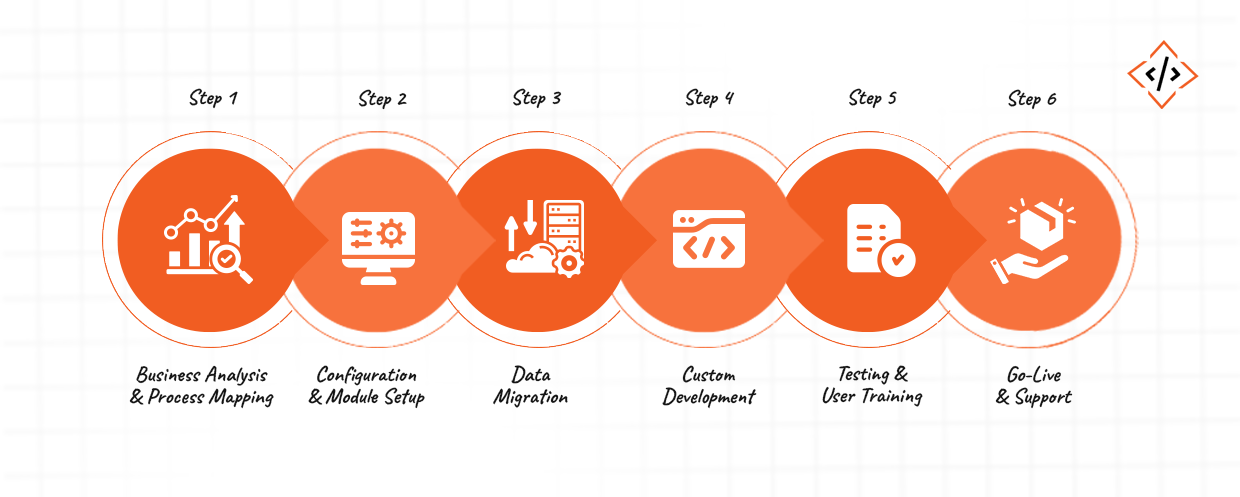
First comes the discovery phase. Here, Odoo consultants or Odoo developers analyze your workflows to identify what’s working and what isn’t. This phase is about translating your real-world operations into Odoo’s ecosystem.
The outcome? A clear implementation blueprint that defines which modules you need. And what customizations are essential, and how data will flow between departments.
Once the plan is ready, the team will configure Odoo modules to match your business model. For instance, a trading company may focus on Inventory while a service-based firm might rely on Projects and Invoicing.
During this phase:
Think of it as tailoring the system before you start using it.
Data migration is where you import your existing records into Odoo. This step requires a lot of precision. You need clean data for reporting and automation to perform correctly from day one.
It is easier when you work with experienced Odoo developers. They often perform multiple test imports to validate everything before the final migration.
Most businesses use Odoo’s standard features. But sometimes, your unique workflow may need customization.
Experienced Odoo developers can help you extend functionality without breaking the system.
Before you roll out Odoo across departments, you run real-world testing. This includes validating workflows and ensuring every module performs as intended.
At the same time, your team undergoes hands-on training for a smooth transition.
Once everything is tested and approved, you officially go live. Post-launch, your Odoo partner monitors system performance. They help you resolve minor issues and suggest new features as your business evolves. Many businesses also schedule quarterly check-ins to optimize workflows based on actual user behaviour.
Even with a powerful platform, success depends on execution and that comes down to your implementation partner.
When evaluating an Odoo development company, look for:
A good partner understands your business goals, suggests smarter workflows, and builds a system that scales.
At CodeTrade, for example, we have seen how the right setup can transform daily operations like shortening order-to-cash cycles by weeks. That’s the difference between using Odoo and leveraging Odoo strategically.
For businesses, growth doesn’t mean adding more tools. It comes from creating clarity. When every team works in sync, decisions get sharper. That’s what Odoo brings to the table; it’s not just automation, but alignment.
Odoo allows you to scale at your own pace. Start with a few modules. Fix the processes slowing you down, and build from there. Each step will bring you closer to a business that runs itself.
At CodeTrade, we have seen how the right Odoo setup can completely change how a company operates.
So don’t wait for the perfect moment. The best time to modernize your business is when you’re ready to grow.
 Hardik Soni
 Hardik Soni
 Hardik Soni
 Hardik Soni
 Chand Prakash